

Disclaimer: This post contains affiliate links to handpicked partners, including tours, gear and booking sites. If you click through or buy something via one of them, I may receive a small commission. This is at no extra cost to you and allows this site to keep running.
This is a sponsored post in collaboration with Surfshark, who provided me with an annual subscription to test their VPN service for an honest review and learn why a VPN is a travel essential.
I know that once I’ve booked flights and start laying plans for the trip ahead, my attention turns immediately to setting up an itinerary of hotel and tour bookings and to shopping for gear and travel insurance. Little thought is given to communication beyond buying an eSIM, yet broader technological security for our devices should also be part of the mix.
Your travels will inevitably take you through all manner of public spaces, from airports and transport hubs to accommodations and locales, where exposure to online security risks increases when you connect to the internet.
Protecting your data and privacy while using the web is as simple as installing and using a Virtual Private Network (VPN), a critical extra technological component for your device, even when using mobile data (local or eSIM) and more so if you rely on public Wi-Fi. I spent years not thinking too deeply about where and when I was logging in, and saw VPNs as useful only in controversial destinations where information is censored.
There are plenty of VPN providers out there, but I’m putting one of the most established – Surfshark – to the test. Said to be one of the better-priced, fastest, and most widely connected services with ‘military grade’ encryption, how does it fare for the everyday traveller?
Looking at the ease of initial setup and the on-the-road benefits, alongside taking a deep dive into Surfshark’s extra security features, here’s why I think having and using a VPN is a crucial second insurance policy when travelling.
Why Use a VPN While Travelling?
Itching thumbs at the ready, it’s become a reflex to immediately source a Wi-Fi connection wherever we are. In airports or stations, at cafes or hotels, and on trains or buses, this typically involves using a public Wi-Fi network. In established social spaces, it’s easy to let our guard down and not think twice about the networks we log into, which can unknowingly connect us to a fake, weak, or unsecured network where our personal data can be compromised.
I’m guilty of having done this in the past, and it’s not surprising that I’ve had my bank cards frozen due to security breaches or ended up on a lot of spam e-mail lists. Lessons learnt, and luckily in a fairly light way.

What are the Core Benefits of VPNs?
VPNs are a funnel for data encryption and location privacy. When you connect to Wi-Fi or a data roaming network and activate a VPN, it creates an encrypted tunnel that secures your browsing activity and masks your IP address, shielding against hackers and suspicious activity.
Let’s break down two core features and one travel hack where a VPN can help when on the road.
Security and Encryption on Public Networks
Connecting to an Open Network Access (Wi-Fi networks that do not require a password) is convenient but unrestricted. Open networks can mimic the name of the place you are trying to pick up Wi-Fi from, or be rogue hotspots designed to steal information. A lack of data encryption means passwords, credit card information, bank logins, and other sensitive data can be leaked, then intercepted and monitored by anyone within range who knows how to exploit it.
What the VPN does: The encryption tunnelling protects your online activity by hiding data and changing your IP address, even on secure networks. It essentially renders all data unreadable while protecting your location privacy.
Access to Geo-Restricted Services
Access to websites and online platforms can be restricted based on a user’s geographic location. Geo-blocking applies to streaming platforms like Netflix as well as critical news websites and social media platforms, which are blocked or censored in some countries.
What the VPN does: It bypasses location restrictions by connecting to servers in multiple countries. Content and critical information services can be accessed as if you were back home, or in a specified location.
Location Switching for Booking Platforms
More of a travel hack than a security feature, but switch your device location to access country-specific booking sites and potentially make some savings. Repeat searches from the same location for flights, hotels, tours and car rentals can show stagnant or higher prices because the platform is trying to get you to book faster.
What the VPN does: It allows you to experiment with locations and price gauging. You’ll need a lot of patience, though it can pay off with savings on higher-priced items.
Is Surfshark a Good VPN for Travellers?
Travel planning is enough of a faff, and I don’t want another complicated app to add to that. Here are my thoughts from testing Surfshark and the VPN’s extra security features.
It’s easy to set up and use
Subscribe based on trip length and desired protection tier. Like most subs, there are set tiers, in this case three (Starter, One, and One+), available in one-month, 12-month, and 24-month contracts. Shorter month contracts are especially handy if you need a higher level of protection for a particularly sensitive destination.
Compare Subscription plans. Using this link, the code: BeckiAdventures should be automatically applied, showing the latest offers.
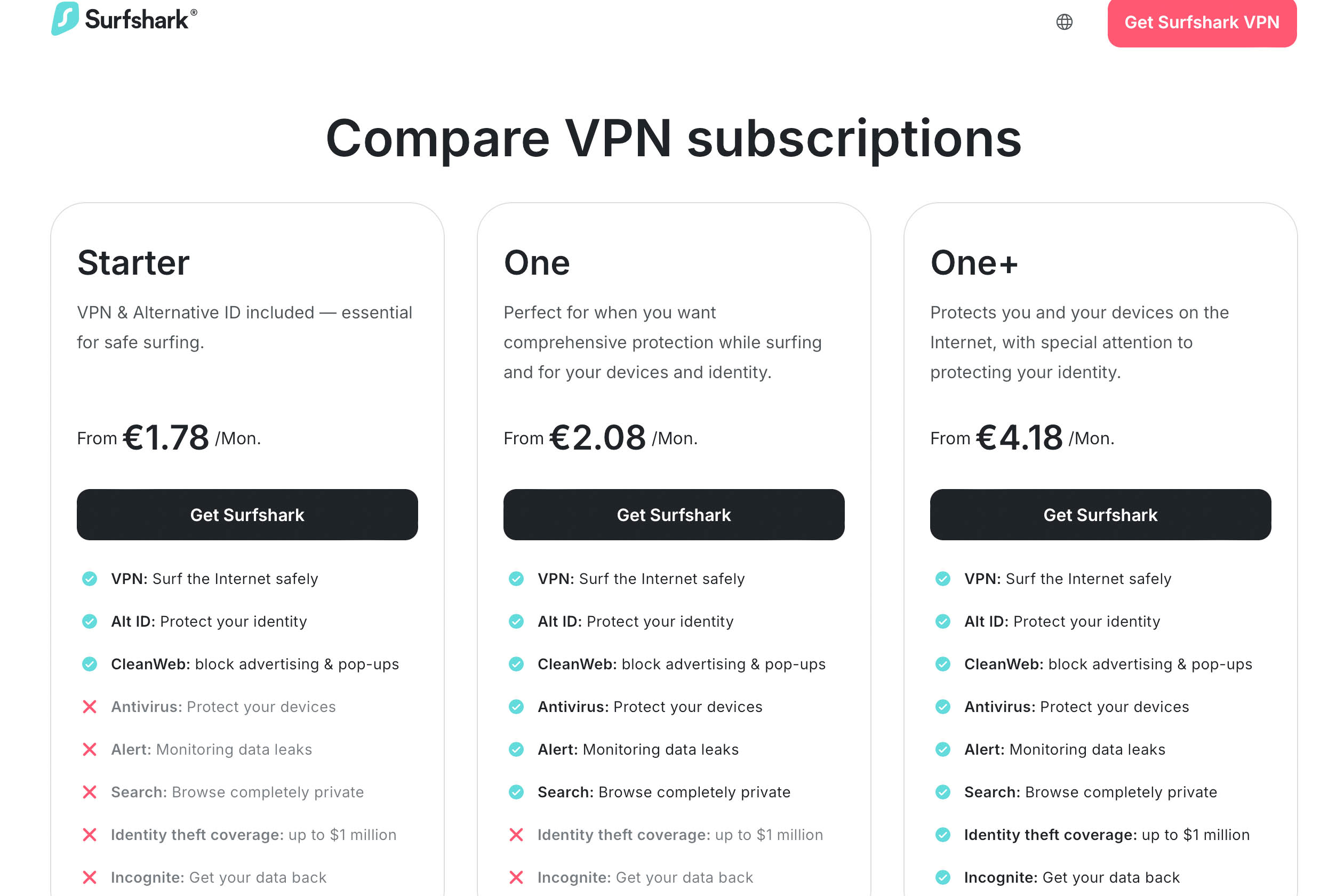
The installation process is straightforward, and what I particularly like is that there is no bewildering dashboard to grapple with. The last thing you need to navigate when travelling is another app. In this case, it’s as easy as choosing a subscription plan, downloading and installing the Surfshark app (available for macOS, Windows, iOS, and Android), logging in and connecting to the VPN. You can also turn on the extra tools and alerts you want to use in a matter of minutes.
Connect an unlimited number of devices to a single account. No separate accounts needed and no extra cost, which is great news for being able to secure smartphones, tablets, laptops, Smart TVs and desktops simultaneously.
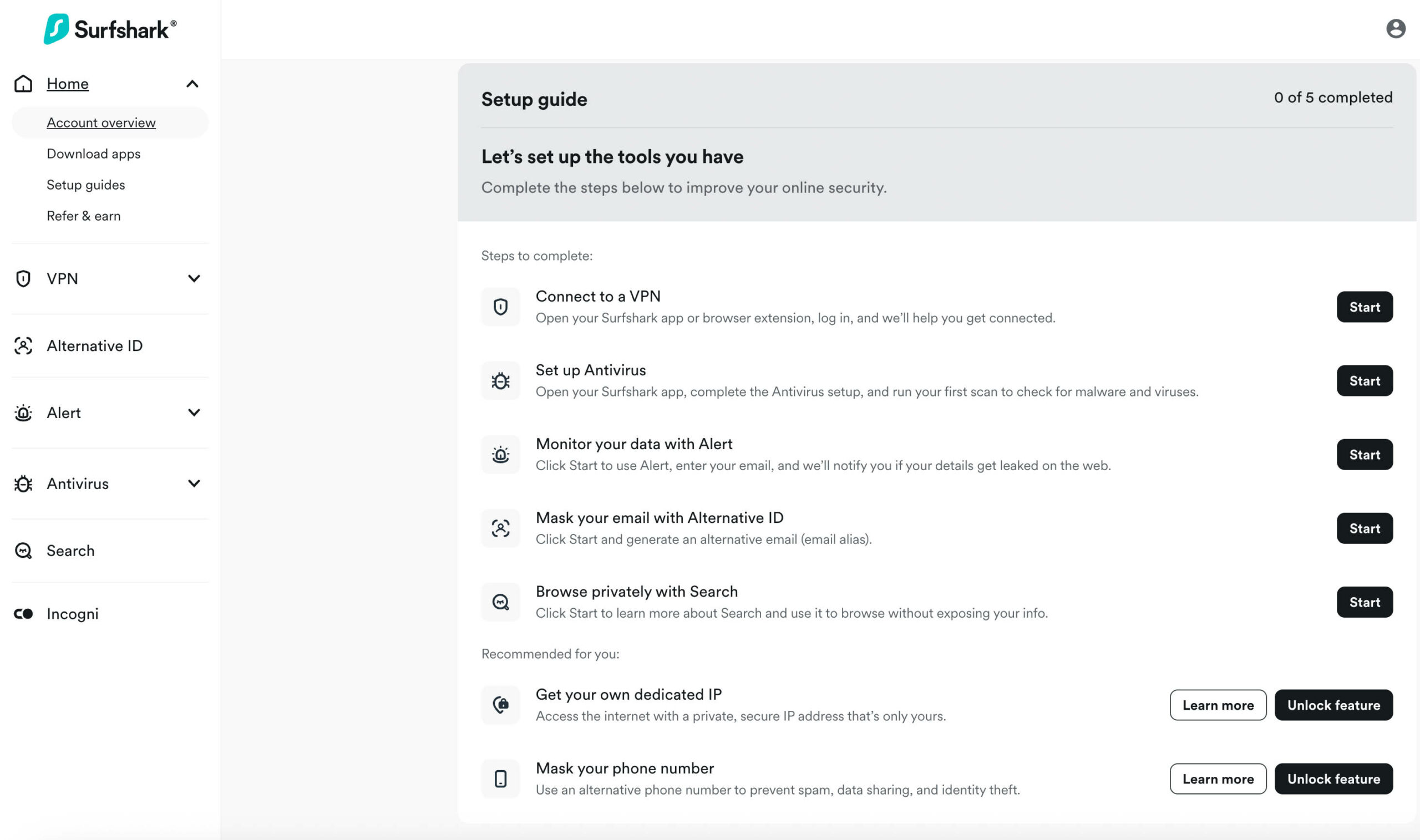
VPN connection is instant and private
As soon as I log in to the app, the VPN setup screen appears with a list of country servers and the suggested fastest location, and I’m connected within seconds. No complicated instructions and no multi-page click-throughs.
Other positive things to note about the VPN are:
Global Server Access. Surfshark can connect to over 3,000 servers across 100+ countries: put simply, there’s a constant stream of reliable connections on mega connection speeds up to 950Mbps, said to be the fastest on the market. However, speed can largely be affected by your location and signal strength.
No-Logs Policy. In addition to the privacy protection the VPN provides, Surfshark also does not keep a record of your online activity, your real location, or your browsing history.
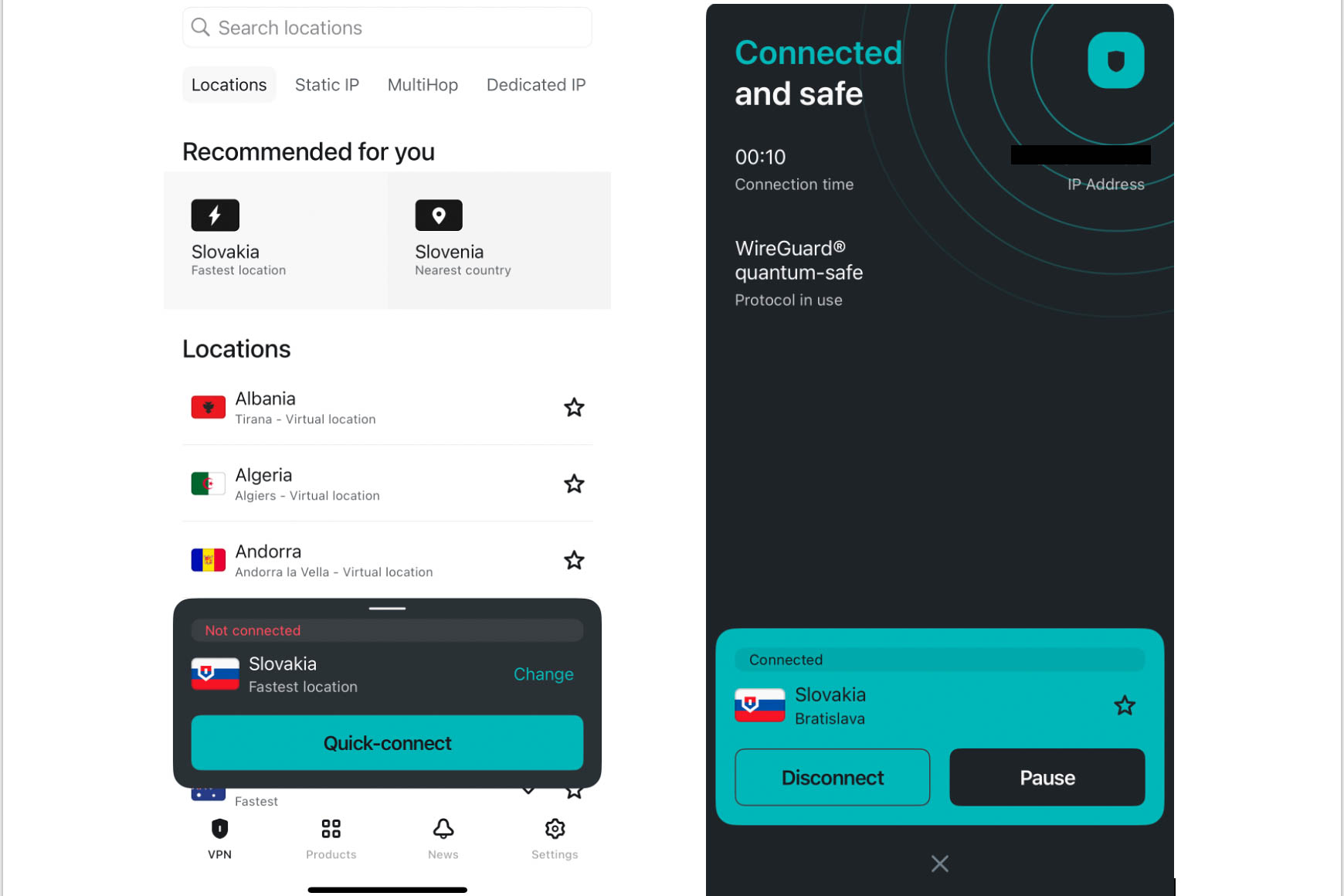
There are opt-in extra security products
The app also lists extra opt-in VPN security products, with brief descriptions. The Surfshark website is chock full of articles if you want to dig into these features in more detail.
Alert. Enable this feature to monitor data links associated with your email address, such as passwords and private addresses. I activated this straight away, and it produced a data leak report within 10 minutes, complete with the data that was leaked, when it happened, and suggested next steps. Note, however, that this feature is not available on the Surfshark Starter subscription.
Alternative ID. Generate an alternative email address to use online instead of your regular one. This feature is available across all subscription tiers and is particularly useful when making multiple bookings while travelling, where your email could end up on all manner of mailing lists.
Search. An inbuilt app search engine without sponsored ads, and which doesn’t track your searches. While a VPN hides your IP address and physical location, search engines still track browsing activity through cookies.
Surfshark’s Advanced Security Features
Surfshark VPN includes a list of toggle buttons for opt-in high security features, which all work in the background after you’ve connected to a secure server and start browsing the web.
CleanWeb. Blocks unwanted ads, intrusive pop-ups, trackers, and malware, which in turn reduces data usage, saving you money on roaming fees.
The Kill Switch. This feature automatically disconnects your internet if the Wi-Fi goes out and your VPN connection drops. It essentially acts as a stopgap to prevent data leaks.
NoBorders. This is an automatically activated VPN mode in extreme cases of geo-blocking and censorship. When the app detects a network restriction, it will connect to the closest server.
Anti-virus protection. Available only on the One and One+ subscriptions, the Antivirus tools include webcam and folder protection, as well as manual malware scans. Ideal when working and connecting on the go. iPhone users take note: it’s not available on iOS; it’s available only on Windows, Android, and macOS.
Is Surfshark Worth it?
It takes one cyber threat to ruin your travels, much like how a personal accident can leave you incapacitated and out of pocket without relevant insurance to cover you. With its robust security features, user-friendly interface across multiple devices, and the ability to bypass even the stealthiest geo-restrictions, I’d say Surfshark is a solid choice in a sea of VPN providers for those who criss-cross multiple countries and casually use the internet, work, and make regular online transactions.
The only thing I’d like to see, in the context of travel, is an even more flexible subscription model, much like eSims and travel insurance, where you can purchase by days and weeks, not just a month as the minimum. Though for many, a level of online protection is just as important every day, even when back at home.
Compare Surfshark VPN Plans. With the Surfshark coupon BeckiAdventures, the latest discounts and offers are automatically applied.



Elowen Voss says
Nice write-up — clear and practical. Quick question: for long multi-country trips with frequent SIM changes, is it better to rely solely on a VPN app on each device or to pair that with a portable travel router running the VPN? Also, any tips on keeping speeds usable when connecting through distant server locations? Thanks!
Becki says
Frequent SIM changes do not matter. The VPN is always running on your device, even when using local eSIM data. And it attempts to connected to the fastest running connection at that moment in time, even if the destination is far away.